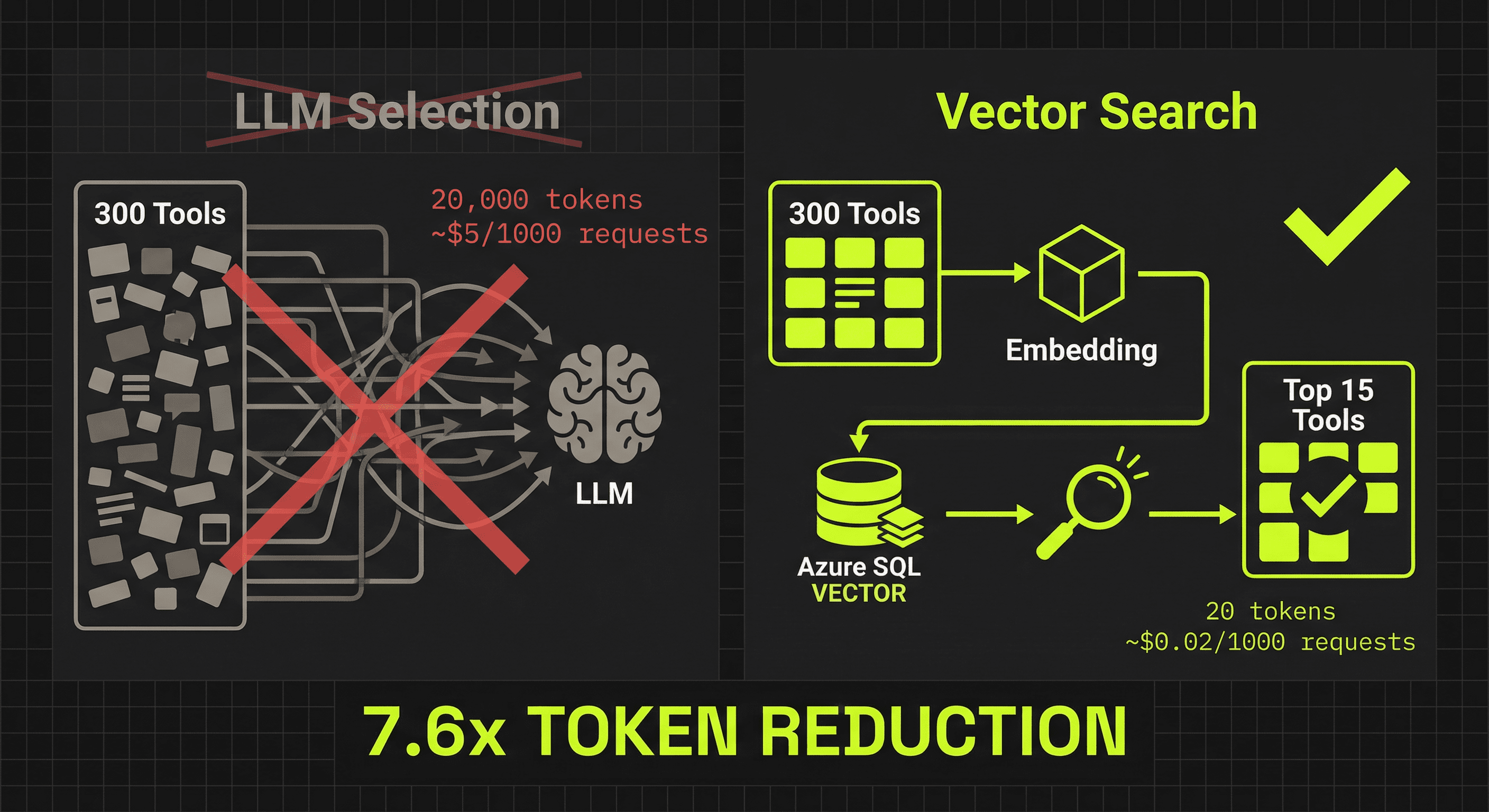
Emcy generates MCP servers from OpenAPI specs. Those specs can have dozens—sometimes hundreds—of endpoints. Each endpoint becomes a tool. When a user sends a message, the agent needs to figure out which tools are relevant.
This is the tool selection problem, and at scale, the standard solution breaks.
The Problem
The typical approach: send every tool's name and description to an LLM, ask it to pick the relevant ones.
For 10 tools, this works. For 300, it doesn't.
Token math for 300 tools:
- Average tool definition: 50 char name + 200 char description = ~63 tokens
- 300 tools × 63 tokens = 18,900 tokens just for summaries
- Add the system prompt + conversation history = easily 25–30K tokens
That's per request. Before the model does any actual work.
The two-pass optimization—use a smaller model like Haiku for selection, then the main model for execution—reduces cost per token but not token volume. You're still sending 18,900 tokens of tool summaries every time. At Anthropic's rate limits, a burst of concurrent users will 429 you.
The Insight
Tool selection is not a language task. It's a retrieval task.
When a user says "get me the Q4 sales report," the system doesn't need to reason about which tool to use. It needs to find the tool whose description is semantically closest to the query. That's what embedding models are for.
Pre-compute an embedding for each tool at import time. At query time, embed the user's message and run a nearest-neighbor search. The top K results are your tool selection. No LLM call required.
Why Azure SQL
We're already on Azure SQL for the rest of the platform. As of SQL Server 2025, it has native vector support:
VECTOR(1536)data type — first-class column type, optimized binary storagevector_distance('cosine', a, b)— hardware-accelerated similarity search- Standard indexing — filtered indexes on the embedding column
- Composable with existing queries — filter by agent, server, enabled status in the same query
No pgvector extension. No separate Pinecone instance. No additional infrastructure to provision, secure, or monitor. The database we already have does the work.
ALTER TABLE Tools ADD Embedding VECTOR(1536);

SELECT TOP 15 Name,
       vector_distance('cosine', @queryEmbedding, Embedding) AS Distance
FROM Tools
WHERE McpServerId = @serverId
  AND Embedding IS NOT NULL
  AND IsEnabled = 1
ORDER BY Distance ASC;
The Pipeline
Import time: When an MCP server syncs, we iterate through its tools and generate an embedding for each one. The input text is simple: "{tool_name}: {tool_description}". The embedding is stored directly in the Tools table as a VECTOR(1536) column.
Query time: The user's message is embedded with the same model (~20 tokens, ~50ms via Azure AI Foundry). A single SQL query using vector_distance('cosine', ...) returns the top 15 tools ordered by similarity (~10ms). Those 15 tools go to the main LLM. Total selection overhead: 20 tokens and 60ms.
Embedding Lifecycle
Embeddings aren't static. Tool descriptions change when an API evolves. We track this:
| Event | Embedding Behavior |
|---|---|
| Tool created | Generate new embedding |
| Name or description changed | Regenerate embedding |
| Tool disabled | Keep embedding — filtered in query via IsEnabled = 1 |
| Tool re-enabled | Existing embedding still valid |
| Tool deleted | Embedding deleted via cascade |
| MCP server re-synced | Only regenerate for tools with changed content |
The key decision: don't regenerate embeddings on enable/disable. The query already filters by IsEnabled, so toggling a tool on or off is instant. Regeneration only fires when the semantic content—name or description—actually changes.
Token Budget: Before and After
| Component | LLM Selection | Semantic Selection |
|---|---|---|
| Tool selection | ~20,000 tokens (Haiku) | ~20 tokens (embedding API) |
| Main LLM call | ~3,000 tokens (15 tools) | ~3,000 tokens (15 tools) |
| Total per request | ~23,000 tokens | ~3,020 tokens |
7.6× reduction in token usage per request.
Cost: Before and After
| Component | LLM Selection | Semantic Selection |
|---|---|---|
| Selection cost per request | ~$0.005 (Haiku) | ~$0.00002 (ada-002) |
| Main LLM per request | ~$0.01 | ~$0.01 |
| Per 1,000 requests | ~$15 | ~$10.02 |
33% cost reduction. Plus: no rate limit pressure on the selection step, because embedding API rate limits are orders of magnitude more permissive than chat completion limits.
Latency
LLM-based selection adds 800–1,200ms of latency before the main call even starts. Semantic selection adds 60ms. The user perceives a meaningfully faster response.
What We Considered and Rejected
Dedicated vector database (Pinecone, Qdrant, Weaviate): Adds infrastructure. Our tool count per agent (tens to low thousands) doesn't justify a separate service. Azure SQL handles this scale trivially.
pgvector on PostgreSQL: Would require migrating off Azure SQL. The rest of our data model—agents, MCP servers, OAuth configurations—is deeply integrated with EF Core and Azure SQL. Not worth the migration cost.
Client-side filtering: Let the LLM client (Claude, Cursor) handle tool selection. This only works when the client has a small enough tool list. At 300 tools, no client handles this well—context windows fill up, and you lose control over selection quality.
Hybrid search (BM25 + vector with RRF): Combining fulltext keyword ranking with vector similarity using Reciprocal Rank Fusion. We designed this but haven't needed it—pure cosine similarity handles our workloads. We'll revisit if we see cases where exact tool name matches are being missed by semantic search alone.
The Stack
Three components. No new infrastructure beyond what the platform already uses. The embedding model is deployed in Azure AI Foundry (same instance we use for the main LLM). The vectors live in Azure SQL (same database as everything else). The selector is a service class in the API.
This system is running in production at Emcy. If you're building MCP infrastructure and hitting the same scaling walls, we'd like to help.